
A trader messaged me last month asking why his AI powered portfolio bot kept leaking strategy logic through API call logs on a third party inference provider. He wasn’t hacked. He just didn’t realize every prompt he sent to run his signal model was sitting on someone else’s server, timestamped and billed per token. That conversation is why this review exists. The Apple M4 chip for local AI inference performance question isn’t really about gaming benchmarks anymore. It’s about whether a trader, a DePIN node operator or a wallet security researcher can run serious AI workloads entirely offline, with zero data leaving their desk.
That shift matters more in crypto than almost anywhere else. People here already obsess over self custody and not trusting third parties with their keys. Running inference on borrowed cloud compute is the same trust problem wearing a different outfit. Your trading logic, your wallet addresses, your on chain research notes, all of it gets typed into a prompt and shipped to a server you don’t control. The M4 family gives crypto builders a genuine alternative, and the performance numbers from 2026 testing are good enough that this stopped being a hobbyist curiosity a while ago.
What Actually Makes the M4 Different From a GPU Box
Traditional AI rigs separate CPU memory from GPU memory (VRAM), which means you’re constantly shuffling data across a slow bus and capped by whatever VRAM your graphics card shipped with. Apple’s unified memory architecture throws that wall out. CPU, GPU and the Neural Engine all share one pool of fast memory, so a model’s weights sit in the same physical RAM the rest of the system uses. That’s the entire reason a Mac with 64GB of unified memory can run models a desktop with a 24GB GPU physically cannot load, even if that GPU is individually faster per core.
The base M4 ships with up to 32GB of unified memory and 120 GB/s of bandwidth. The M4 Pro offers up to 64GB with 273 GB/s bandwidth, a 75 percent jump over the previous generation. The M4 Max tops out at 128GB with as much as 546 GB/s. Since LLM inference is overwhelmingly memory bandwidth bound rather than compute bound, that bandwidth number predicts tokens per second far better than clock speed or core count. It’s the single spec that actually matters here.
M4 vs M4 Pro vs M4 Max: The Real Numbers
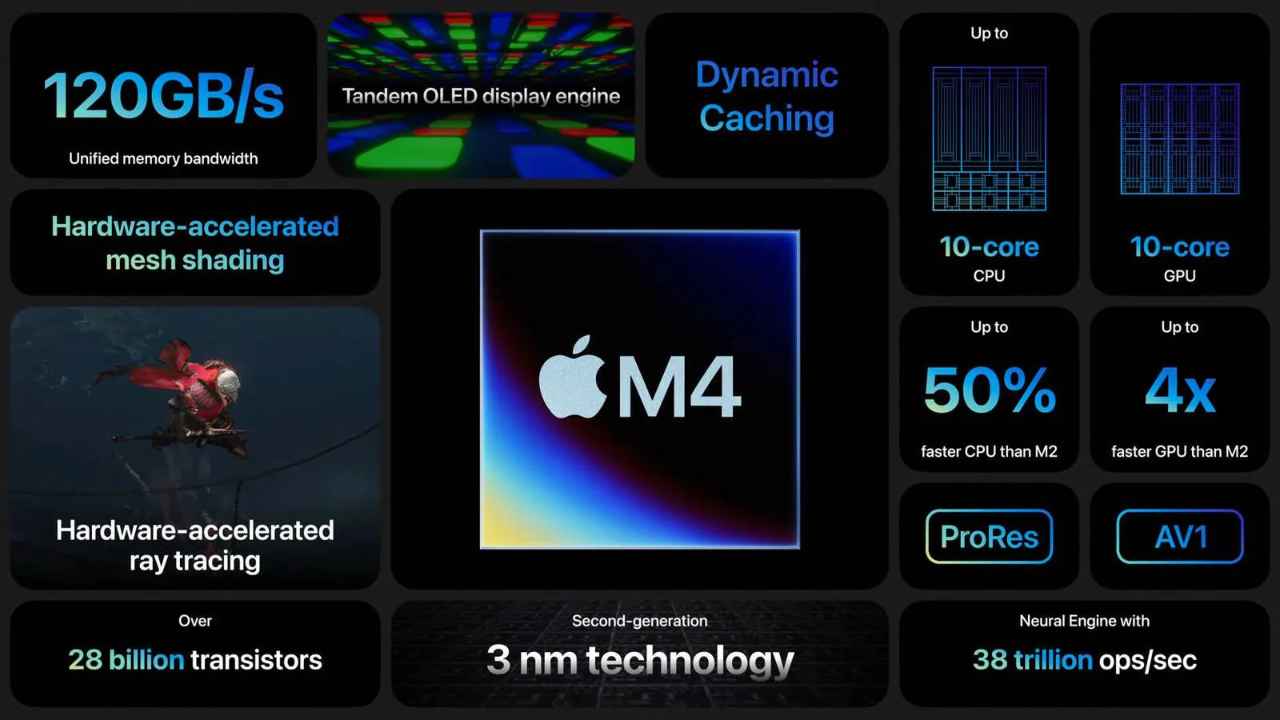
Marketing slides love to talk in TOPS and core counts. Traders want tokens per second, because that’s what determines whether a local model can actually keep pace with a live market feed or a wallet scan running in a loop. Here’s what independent benchmarking using llama.cpp and MLX on quantized models actually shows across the lineup, based on 2026 community and lab testing.
| Chip | Memory Bandwidth | 7B Model (Q4) | 30B Model (Q4) | 70B Model (Q4) | Best Fit |
|---|---|---|---|---|---|
| M4 | 120 GB/s | 25 to 35 tok/s | Not recommended | Not viable | Light agents, quick lookups |
| M4 Pro | 273 GB/s | 45 to 60 tok/s | 20 to 28 tok/s | Painfully slow | Daily trading bot inference |
| M4 Max | 410 to 546 GB/s | 60 to 80 tok/s | 35 to 45 tok/s | 8 to 14 tok/s | Production grade agents |
Two things jump out of that table. First, the jump from M4 to M4 Pro to M4 Max tracks almost exactly with the bandwidth jump, which confirms bandwidth really is the bottleneck everyone claims it is. Second, 70B class models are still rough on even the Max chip. If your crypto workflow needs frontier level reasoning at 70B plus, you’re still better off calling a cloud API for that specific task and keeping only the sensitive, repetitive stuff local.
Where This Actually Matters for Crypto Workflows
Benchmarks are interesting, but the real question is what a crypto builder gains by moving inference onto an M4 Mac instead of a cloud endpoint. A few use cases keep showing up in practice.
- Trading bot signal generation. Running a 7B or 13B model locally for sentiment scoring or pattern recognition means your strategy never touches a third party log file, and you’re not paying per token during high frequency testing loops.
- Wallet and seed phrase security scanning. Feeding transaction histories or suspicious contract code into a cloud model means sending that data somewhere. Local inference keeps it on device, which matters a lot given how often phishing and approval drain attacks start with leaked research notes.
- On chain data summarization. Parsing block explorer dumps, smart contract audits or governance proposals locally is fast enough on an M4 Pro for daily research without a subscription bill stacking up.
- DePIN compute contribution. Idle M4 bandwidth can be rented through networks like io.net or Render during off hours, turning a research machine into a small revenue stream rather than a sunk cost.
- Agent prototyping before production deployment. Builders testing autonomous trading agents can iterate locally for free before committing to a paid cloud deployment once the logic is proven.
Each of these leans on the same underlying fact: local inference removes a trust dependency, and in an industry built around removing trust dependencies, that’s not a minor feature. It’s the whole pitch.
The Cost Math: Hardware vs Cloud vs DePIN Rentals
Here’s where the analysis gets genuinely useful instead of just technically interesting. A Mac mini with the M4 Pro and 64GB of memory runs around $1,999. Compare that against a frontier cloud API billed around $5 per million input tokens and $25 per million output tokens for premium models, which is roughly where top tier providers sat through mid 2026. A trading bot running continuous sentiment analysis across hundreds of tokens a day on a busy market can burn through millions of tokens in weeks, not months.
| Factor | Local M4 Pro | Cloud API | DePIN Compute Rental |
|---|---|---|---|
| Upfront Cost | ~$2,000 | $0 | $0 to minimal |
| Marginal Cost | Electricity only | Per token, scales with use | Per hour, market rate |
| Data Privacy | Full control | Shared with provider | Shared with renter |
| Max Model Size | 30B comfortably | Unlimited (frontier models) | Depends on rented node |
| Breakeven Point | 2 to 4 months of heavy use | Immediate | Immediate |
For a solo trader running a bot around the clock, the machine usually pays for itself inside a single quarter, and after that every query is essentially free. For teams needing 70B plus reasoning or burst capacity, a hybrid setup, local for routine and sensitive work, cloud or DePIN rental for the occasional heavy lift, tends to be the most rational architecture.
The Limits Nobody Puts on the Marketing Slide
None of this works if you buy the hype without reading the fine print. A few limitations show up once you move past the demo and into daily use.
- No CUDA ecosystem. Most cutting edge research code still targets Nvidia first, so some newer models or fine tuning frameworks take longer to arrive on Apple Silicon, if they arrive at all.
- Fine tuning is limited. Inference is strong, but training or fine tuning large models locally is slow and memory hungry even on the Max chip. Most builders still rent cloud GPUs for that step.
- Batch throughput lags dedicated GPU rigs. A single Nvidia H100 crushes an M4 Max on concurrent, high volume requests. The M4 wins on single user, interactive latency, not on serving many users at once.
- 70B and larger models stay sluggish. Even on the Max chip, you’re looking at single digit to low teens tokens per second on the biggest open weight models, which feels slow for anything beyond background processing.
- Thermal throttling under sustained load. Long running agent loops on a MacBook can throttle over time, so a Mac Studio or Mac mini with better cooling is the smarter pick for anything running continuously.
Setting It Up Without the Headache
Getting a local model running on an M4 Mac doesn’t require a computer science degree. Ollama remains the simplest entry point, a single terminal command pulls and runs a quantized model with an OpenAI compatible local API, so existing bot code often needs only a URL change to point at localhost instead of a cloud endpoint. LM Studio offers the same idea with a graphical interface, better suited for builders who want to compare models visually first. For anyone chasing the last few tokens per second, Apple’s own MLX framework consistently edges out llama.cpp based tools by tapping the Neural Engine more directly, though it demands more comfort with Python.
Verdict: Should a Crypto Builder Actually Buy One
If your work involves repeated, sensitive or high volume AI tasks, wallet scanning, trading signal generation, research summarization, the M4 Pro with 48GB or 64GB of memory is the realistic sweet spot. It handles 13B to 30B class models comfortably, keeps data off third party servers, and pays for itself against API bills faster than most expect. The base M4 is fine for light, occasional use but will frustrate anyone running a real pipeline. The M4 Max only earns its premium if you’re regularly pushing 30B plus models or need headroom for multiple agents. For frontier level reasoning beyond what local hardware can hold, pairing a local M4 setup with selective cloud API calls remains the most practical architecture for serious crypto builders in 2026.
Frequently Asked Questions
Is the Apple M4 chip good for local AI inference in crypto trading bots? Yes, for models in the 7B to 30B range the M4 Pro and M4 Max deliver usable tokens per second for sentiment analysis, pattern recognition and research summarization, with the added benefit of keeping strategy data off third party servers.
How many tokens per second does the M4 Max get on a 70B model? Independent 2026 benchmarks show roughly 8 to 14 tokens per second on 70B Q4 quantized models, which is usable for background tasks but noticeably slow for interactive, real time chat style use.
Is local inference cheaper than using a cloud AI API? For heavy, continuous use it usually becomes cheaper within two to four months once hardware cost is weighed against per token cloud billing. For occasional light use, a cloud API with no upfront cost can still be the better deal.
Can an M4 Mac replace a GPU rig for AI work? Not entirely. It replaces a GPU rig well for single user inference and privacy sensitive tasks, but it does not match a dedicated Nvidia GPU setup for fine tuning or high volume concurrent serving.
What is the minimum memory needed to run useful local models on M4? 24GB of unified memory is a reasonable practical minimum for running 7B to 13B class models comfortably, with 48GB or more recommended for anyone planning to move up to 30B class models.