
A friend of mine runs a small motion design studio out of Pune. Three clients, one deadline, and a scene that needed 40 GPU hours to render overnight. He spun up an AWS g5 instance to be safe. He woke up to a bill that made him check his card statement twice.
That one night cost more than his monthly software subscriptions combined. So he asked me the question I get a lot these days. Is Render Network actually cheaper than AWS, or is that just a crypto Twitter talking point?
I went and pulled the real numbers. Here they are.
Quick Answer Before We Go Deep
Render Network usually costs less per hour of usable GPU compute than AWS, sometimes by a wide margin. But the comparison only holds up cleanly for rendering and inference style workloads. For large scale AI training, tightly coupled clusters or anything needing enterprise SLAs, AWS still has an edge that Render doesn’t try to compete with.
That’s the honest version. Now let’s look at why.
How Render Network Actually Prices GPU Work
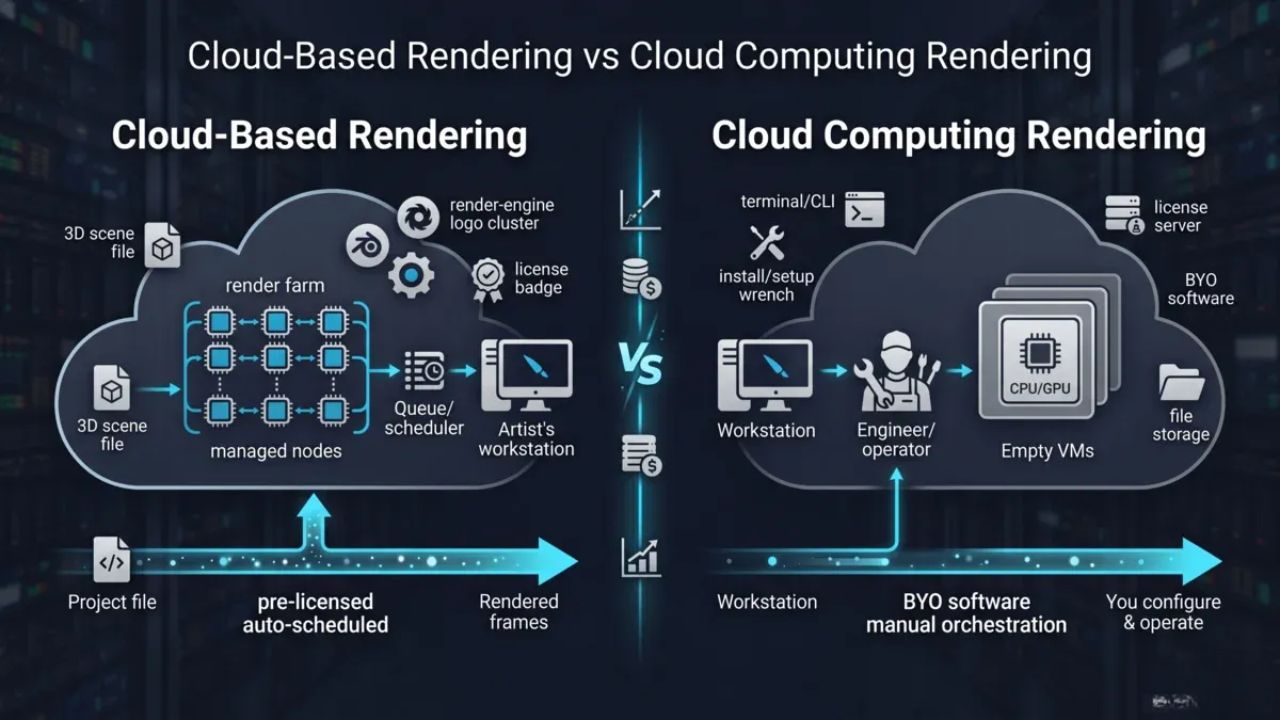
Render doesn’t sell you a GPU by the hour the way AWS does. It sells you compute by the OctaneBench hour, or OBh. OctaneBench is a standardized benchmark that scores how much rendering work a GPU can push out. One OBh is one hour of work at that benchmark rate.
Here’s why that matters. Two GPUs can both cost the same “per hour,” but if one is twice as fast, you’re paying double for the same job on the slower card. OBh billing removes that guesswork. You pay for the work done, not the wall clock time a card sat there.
Render runs three pricing tiers on its network, based on speed and job priority:
- Economy tier: roughly €0.25 to €0.50 per 200 OBh, for jobs with no time pressure
- Priority tier: roughly €0.50 to €2.00 per 200 OBh, for faster turnaround
- Trusted tier: reserved nodes for studios needing guaranteed uptime
For context, 200 OBh is roughly the throughput of one RTX 2070 running for an hour. On the wider render farm market that uses the same OBh standard, rates land between $0.0025 and $0.0054 per OctaneBench hour depending on the provider. Render sits at the affordable end of that range.
How AWS Actually Prices GPU Instances
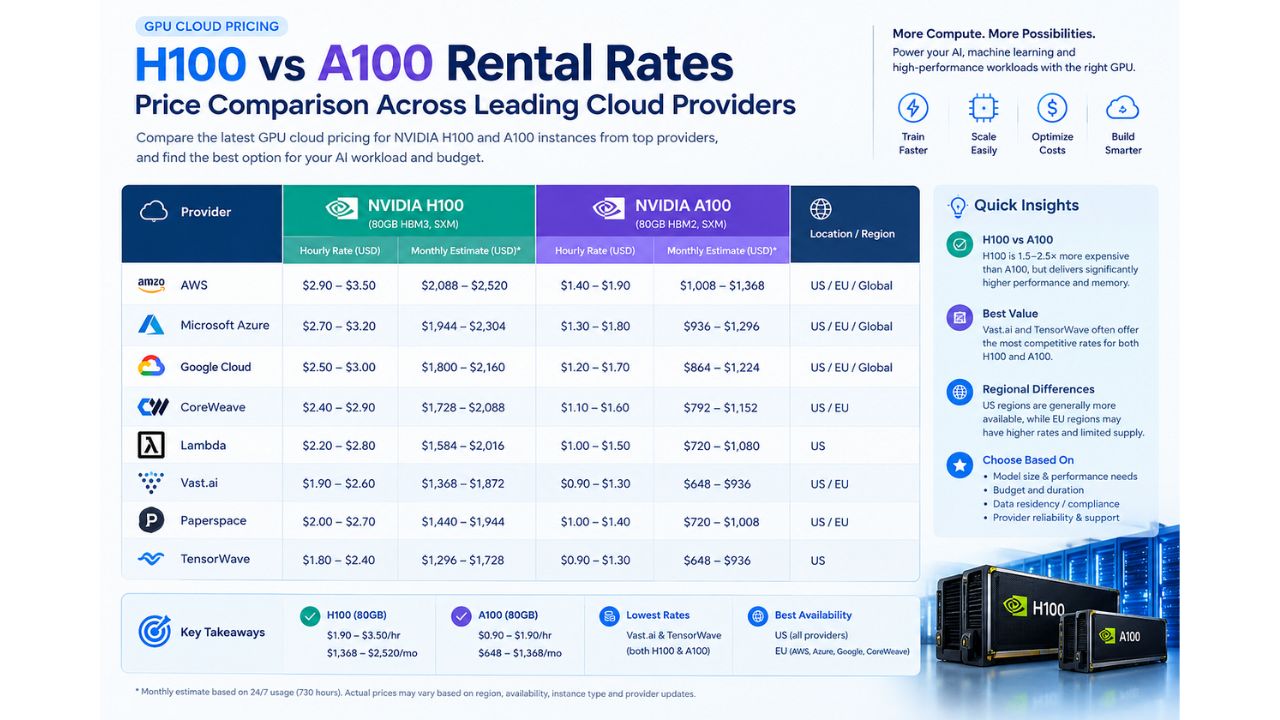
AWS takes the opposite approach. You rent a fixed instance type for a fixed hourly rate, and you pay that rate whether your job uses the full GPU or not. Here’s where things stand as of September 2026:
| Instance Family | GPU | On-Demand Range (per hour) |
|---|---|---|
| G4 (T4) | NVIDIA T4 | $0.53 to $9.39 |
| G5 (A10G) | NVIDIA A10G | $1.00 to $16.29 |
| G6 (L4/L40S) | NVIDIA L4, L40S | $0.80 to $30.13 |
| P4 (A100) | NVIDIA A100 | $21.96 to $27.45 |
| P5 (H100/H200) | NVIDIA H100, H200 | $6.88 to $79.12 |
| P6 (B200/B300) | NVIDIA B200, B300 | $113.93 to $142.42 |
A single g5.xlarge with one A10G GPU runs about $1.01 an hour. That’s the entry point most small studios and solo developers actually use, not the eight GPU monsters you see quoted in headlines. AWS also cut P4 and P5 pricing by up to 45 percent in mid 2025, so the gap with alternative providers has narrowed some. It hasn’t closed though.
Render Network GPU Pricing vs AWS: The Side By Side
Numbers mean more with a real workload attached to them. Let’s price out a common job: 40 hours of GPU rendering on a mid range card, the same job my friend in Pune ran.
| Factor | Render Network | AWS (g5.xlarge) |
|---|---|---|
| Billing unit | Pay per OctaneBench hour of actual render output | Pay per instance hour, GPU idle time included |
| Approx cost for 40 hrs of comparable output | $40 to $80 | $40 to $60 (at $1.01/hr, no idle waste) |
| Setup time | Minutes, job submission portal | Minutes to hours, AMI/driver setup |
| Idle time billing | None, you pay for work done | Yes, billed from launch to termination |
| Payment currency | RENDER token (or fiat converted at checkout) | USD, credit card or AWS billing account |
| Best for | Rendering, inference, batch creative jobs | Training, enterprise workloads, compliance heavy jobs |
Notice something. On paper, a single well managed g5.xlarge instance can actually come close to Render’s price for a clean, fully utilized 40 hour job. The real gap opens up somewhere else entirely, and that’s the part most comparisons skip.
Where The Real Savings Actually Show Up
Nobody runs a perfectly utilized GPU instance. That’s the catch AWS pricing pages never mention.
Here’s what actually eats your AWS bill:
- Idle time. You spin up an instance, it takes 10 minutes to boot and configure, you forget to shut it down after the job finishes, and you’re billed for all of it.
- Overprovisioning. Most teams size up “just in case,” landing on a bigger instance than the job needs.
- Egress fees. Moving rendered output or trained model weights out of AWS costs extra, and it adds up fast on large files.
- Reserved capacity waste. Committing to savings plans locks in a rate, but only pays off if you actually hit that usage every month.
Render sidesteps most of this by design. You submit a job, it renders, you get billed for what ran. No idle clock ticking while you tab away to check email. For bursty, project based workloads like a studio taking on client jobs, that structural difference tends to matter more than the sticker price on either platform.
Think about how most creative studios actually work. A job comes in, the team scrambles for two or three days, then it goes quiet for a week. AWS pricing assumes you’re the one managing that lifecycle, spinning instances up and down yourself, watching the clock. Render’s job based billing removes that management overhead entirely. You upload the scene, set the tier, and walk away. The bill reflects the work, not your attentiveness to a dashboard at midnight.
That difference sounds small until you multiply it across a year of freelance jobs. A studio running 15 to 20 short renders a month, each with a bit of forgotten idle time on AWS, can easily bleed 20 to 30 percent of its compute budget on waste that never shows up as a line item. It just shows up as a bigger bill than expected.
The RENDER Token Factor Nobody Talks About Enough
Here’s the part that trips people up. Render jobs settle in RENDER tokens through a burn and mint equilibrium model. You pay in fiat equivalent value, the network converts and burns RENDER to cover it, and node operators earn new RENDER as a reward.
Practically, this means your invoice is pegged to a USD value, not the raw token price. RENDER has traded anywhere from roughly $1.30 to $1.80 through much of 2026, and the burn mechanism is meant to smooth out day to day volatility on the billing side. Still, it’s worth knowing you’re transacting through a token layer, even if you never touch a wallet directly and pay by card at checkout.
AWS has no such layer. You pay AWS, AWS bills your card or invoice. Simple, boring, predictable. For finance teams that hate explaining “why does our cloud bill fluctuate with crypto markets,” that predictability alone can settle the decision.
When AWS Is Still The Better Call
I’m not going to pretend Render wins every scenario, because it doesn’t.
AWS still makes more sense when:
- You need multi GPU clusters with tight interconnects for large model training
- Your compliance team requires SOC 2, HIPAA or specific data residency guarantees
- You need guaranteed capacity through Reserved Instances or Capacity Blocks
- Your workload depends on AWS native tooling like SageMaker, S3 pipelines or VPC peering
- You need 24/7 enterprise support with contractual uptime SLAs
Render’s node network is powered by independent operators sharing spare GPU capacity, similar to Airbnb for compute. That’s fantastic for cost and for soaking up demand spikes. It’s not built for the kind of guaranteed, audited, always on infrastructure a regulated fintech or a frontier AI lab needs.
Render Network GPU Pricing vs AWS: The Practical Verdict
If your work is rendering, creative rework, inference jobs or short bursty compute, price it out on Render first. The OBh model rewards you for using efficient hardware and punishes nothing for stopping early.
If your work is long running training jobs, needs enterprise guarantees, or has to live inside a specific compliance boundary, AWS is still the safer default, even at a higher sticker price.
A lot of studios end up running both. Render for the daily creative grind, AWS for the occasional job that needs guaranteed capacity or specific tooling. That hybrid approach is quietly becoming the norm across small and mid sized creative and AI shops in 2026.
Frequently Asked Questions
Is Render Network cheaper than AWS for GPU rendering? For most rendering and inference workloads, yes. Render’s OctaneBench hour billing means you only pay for actual compute delivered, while AWS bills for the full instance hour including idle and setup time.
Do I need to hold crypto to use Render Network? No. You can pay in fiat at checkout and the network handles the RENDER token conversion and burn behind the scenes.
What is the cheapest AWS GPU instance for small render jobs? The g4dn.xlarge with one NVIDIA T4 starts around $0.53 an hour, and the g5.xlarge with one A10G starts around $1.01 an hour, both reasonable entry points for light workloads.
Can Render Network handle AI training, not just rendering? Render has expanded into AI and inference workloads alongside its rendering roots, but AWS remains the stronger choice for large scale distributed training that needs tightly coupled multi GPU clusters.
Does AWS or Render Network have better uptime guarantees? AWS, by a wide margin. Its enterprise SLAs and reserved capacity options are built for guaranteed uptime. Render’s node network depends on independent operators, so job completion reliability varies by tier and node reputation.
How does Render Network’s OBh pricing compare to other cloud render farms? Render sits toward the affordable end. Industry OctaneBench hour rates across providers run roughly $0.0025 to $0.0054, and Render’s tiered pricing structure lands within that same competitive band rather than undercutting or overcharging the wider market.